
Configuring a custom domain for an Azure App Service including a App Service Managed Certificate is the kind of task where I constantly have to look up the details. For this reason, and because a colleague asked me to blog about it, I decided to briefly document the process here.
In the example described here, a custom subdomain is configured as the App Service custom domain.
Prerequisites and versions
- Azure App Service in the
Basictier or higher (Freetier does not support custom domain feature) - Terraform version
1.13.3 hashicorp/azurermversion4.49.0
IaC configuration
The Infrastructure as Code (IaC) configuration for adding a custom domain to an Azure App Service including App Service Managed Certificate looks as following when using Terraform.
# Azure App Service Plan and App Service
resource "azurerm_service_plan" "appplan" {
  name                = replace(local.name_template, "<service>", "applan")
  resource_group_name = azurerm_resource_group.rg.name
  location            = var.default_location
  os_type             = "Linux"
  sku_name            = var.app_sku_name
  worker_count        = var.app_worker_count
}

resource "azurerm_linux_web_app" "appsrv" {
  name                = replace(local.name_template, "<service>", "appsrv")
  resource_group_name = azurerm_resource_group.rg.name
  location            = var.default_location
  service_plan_id     = azurerm_service_plan.appplan.id
  https_only          = true
  site_config {
    application_stack {
      dotnet_version = "9.0"
    }
    http2_enabled = true
    always_on     = false
  }
  identity {
    type = "SystemAssigned"
  }
  app_settings = merge(
    {
      "WEBSITE_RUN_FROM_PACKAGE" = "1"
    }
  )
  lifecycle {
    ignore_changes = [
      site_config["application_stack"]
    ]
  }
}

# Azure App Service custom domain and SSL certificate

## Azure DNS CNAME entry for custom domain
# resource "azurerm_dns_txt_record" "domain-verification" {
#   name                = "asuid.api.domain.com"
#   zone_name           = var.azure_dns_zone
#   resource_group_name = var.azure_resource_group_name
#   ttl                 = 300
#   record {
#     value = azurerm_linux_web_app.appsrv.custom_domain_verification_id
#   }
# }

# resource "azurerm_dns_cname_record" "cname-record" {
#   name                = "domain.com"
#   zone_name           = azurerm_dns_zone.dns-zone.name
#   resource_group_name = var.azure_resource_group_name
#   ttl                 = 300
#   record              = azurerm_linux_web_app.appsrv.default_hostname
#   depends_on = [azurerm_dns_txt_record.domain-verification]
# }

resource "azurerm_app_service_custom_hostname_binding" "appsrv-hostname-binding" {
  count               = var.custom_domain_name != "" ? 1 : 0
  hostname            = var.custom_domain_name
  app_service_name    = azurerm_linux_web_app.appsrv.name
  resource_group_name = azurerm_resource_group.rg.name
  // depends_on = [azurerm_dns_cname_record.cname-record]

  # Ignore ssl_state and thumbprint as they are managed using
  # azurerm_app_service_certificate_binding.example
  lifecycle {
    ignore_changes = [ssl_state, thumbprint]
  }
}

resource "azurerm_app_service_managed_certificate" "appsrv_cert" {
  count                      = var.custom_domain_name != "" ? 1 : 0
  custom_hostname_binding_id = azurerm_app_service_custom_hostname_binding.appsrv-hostname-binding.0.id
}

resource "azurerm_app_service_certificate_binding" "appsrv_cert_bind" {
  count               = var.custom_domain_name != "" ? 1 : 0
  hostname_binding_id = azurerm_app_service_custom_hostname_binding.appsrv-hostname-binding.0.id
  certificate_id      = azurerm_app_service_managed_certificate.appsrv_cert.0.id
  ssl_state           = "SniEnabled"
}
Besides the App Service Plan and the App Service, the IaC configuration additionally defines the following resources.
azurerm_dns_txt_record– TXT record (only to be used, if and only if DNS of custom domain is also managed within the same Azure tenant and if its intended to managed DNS from the same IaC configuration as the Azure App Service)azurerm_dns_cname_recordCNAME record (only to be used, if and only if DNS of custom domain is also managed within the same Azure tenant and if its intended to managed DNS from the same IaC configuration as the Azure App Service)azurerm_app_service_custom_hostname_binding– binding of the custom domain / custom subdomain to the Azure App Serviceazurerm_app_service_managed_certificate– App Service Managed Certificateazurerm_app_service_certificate_binding– Binding of the App Service Managed Certificate to the custom domain / custom subdomain
Apply to infrastructure
If the above configuration is applied to the infrastructure with Terraform, the following error occurs.
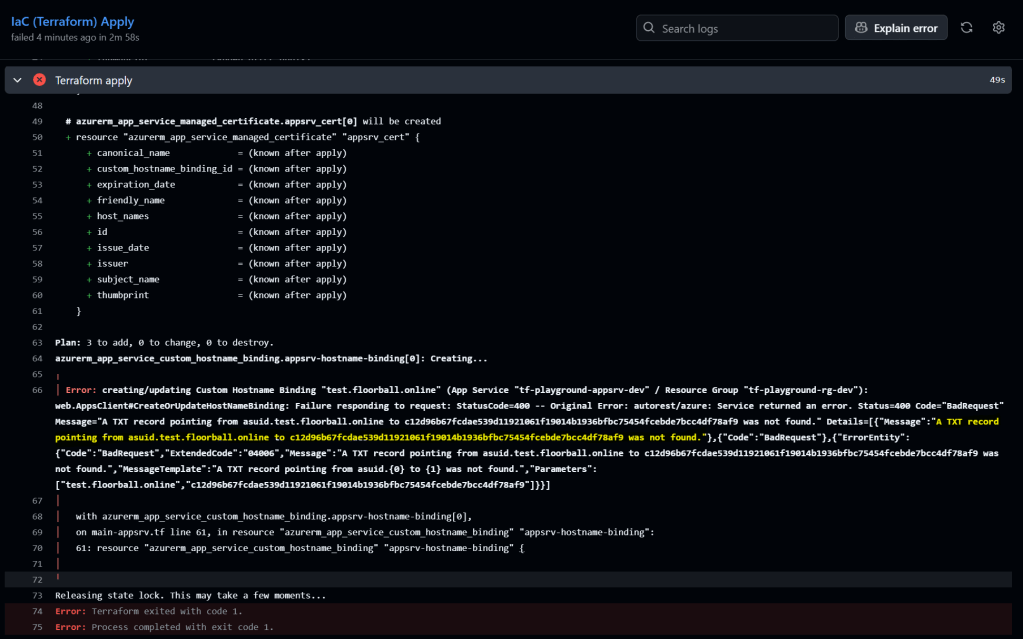
A TXT record pointing from asuid.subdomain.domain.topleveldomain to CUSTOM_DOMAIN_VERIFICATION_ID was not found.
Here, a manual step is required if the custom domains DNS isn’t managed within the same IaC configuration (i.e. if the custom domains DNS is managed at a domain name registrar like United Domains). The manual step is to add the required DNS records as described in the official documentation.
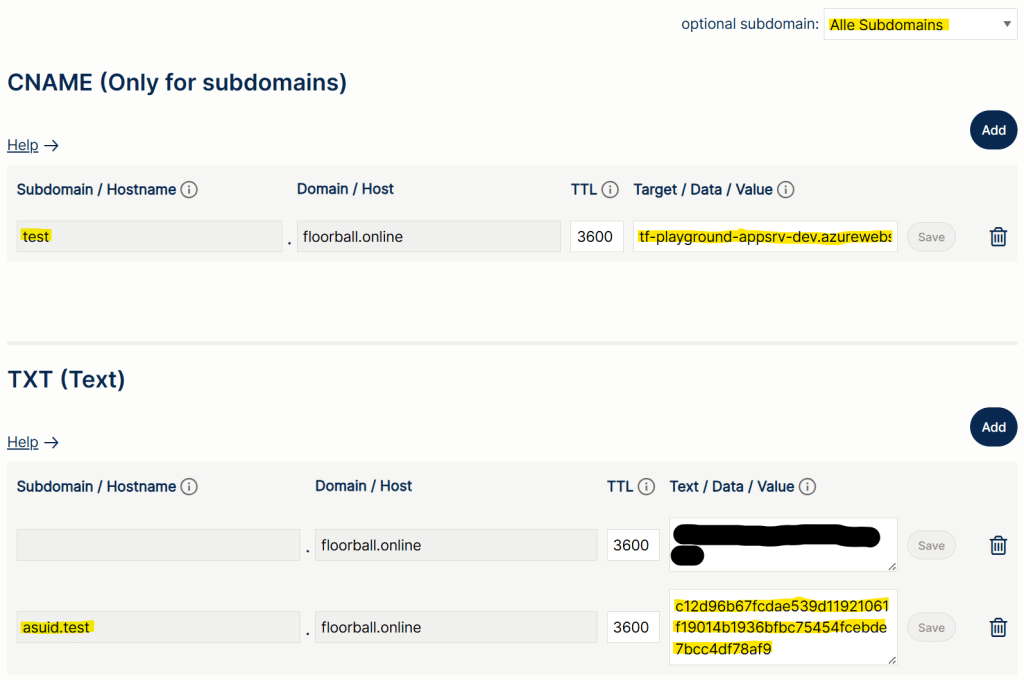
After adding the required DNS records, just re-run the failed run.
The complete example can be find on GitHub: https://github.com/rufer7/terraform-playground

 blog.rufer.be
Leave a comment